
“I worry, sometimes, that in some afterlife, I’ll be forced to watch myself from my phone’s perspective: some years-long montage of all the moments where my mouth was half open, where my finger gluttonously typed, where carpal tunnel blossomed, while behind my head: life whooshed by”
– PJ Vogt, Search Engine
I’ve wondered about similarly terrifying fates; answers to questions I’m not particularly keen to find out: have my thumbs scrolled more miles than my feet have walked? How much time have I actually lost on this digital drain?
Recently, I rather eagerly bought YouTube Premium, thinking it would transform the watching experience I was becoming so frustrated with. Sitting through minutes of un-skippable ads just to find that the video I clicked on had an AI generated script or lacked any real depth: each regurgitating the same lukewarm takes I’d already seen on Twitter. I was paying eight dollars a month to remove ads, I would pay triple that to stop the eye rolls each time I’m forced to listen to the same insufferable speech patterns from an LLM.
“And honestly? Here’s what they don’t tell you, the whole time this was happening, it was quietly building something in the background, something no one would see coming. Not just…” I’m tired! Is every platform destined to see the same fate that LinkedIn is suffering?
Generative AI makes creating this sort of content all too accessible. Content should be born out of passion, rage, or at least a genuine interest, not trying to make a quick buck off a hot topic and an overworked Claude account.
Lately I’ve been trying to pivot to podcasts. I revisited ones I used to love: Scamfluencers, Embedded, and Search Engine. It was there where I caught PJ Vogt’s episode “How to stop being so phone addicted (without self-discipline or meditation)” with special guest David Pierce.
The episode was incredible, one I highly recommend you check out regardless of your relationship with your phone. The episode goes further into the actual policies behind this massive issue and sparked some really interesting conversations.
One particular strategy stuck with me: using a 10-foot charging cable to serve as your phone’s leash. By keeping it plugged into a designated spot, you effectively recreate the concept of a family computer room. Using technology becomes a deliberate choice.
They also introduced two marketed gadgets: The Brick and The Light Phone. Desperate for relief, I was ready to pull out my wallet and purchase a band-aid for a bullet wound.
- A Brick: A $60 plastic square equipped with an NFC tag and a magnet that lets you “tap in” or “tap out” of specific apps. Tapping out locks down whatever you’ve flagged as problematic until you physically tap the square again. Beyond the compounding cost of buying multiples to cover different locations (like one for home, one for work), the biggest issue is in applied effectiveness. My sub-1,000-square-foot apartment doesn’t exactly deter me from walking ten feet to unlock an app, and “bricking” your phone is just another habit you have to build. Ultimately, it requires far too much willpower for trained thumbs that crave the algorithm.
- A Light Phone: A minimalist mobile phone that doesn’t even give you the option to be distracted. No TikTok, no Instagram, no YouTube, no web browser. Only absolute bare necessities. There’s the Light 3 on preorder for $900 that fits most of my needs or a $300 tier, the Light 2, lacking reliable navigation and a camera at all. While I was tempted, I couldn’t see myself giving up my beloved, endless music library or decent photo quality. Beyond that, the dumb-phone is not compatible with even the healthy apps I’ve come to love: Notion, Google Calendar, Oura, and Sleep Cycle. A total device swap was impractical and far too rigid.
The speakers on the episode seemed to share many of the same hesitations I had, but couldn’t quite fill the negative space with an alternative. I needed a more personalized, and significantly cheaper, solution.
A dumb phone is not the answer. A smart-er phone is.
The iPhone already in your pocket is capable of so much. I think we need to redirect our efforts from interacting with technology less to interacting with it meaningfully.
I spent the rest of the month trialing various tools myself. Seeing what was actually tenacious against an infectious addiction. Here is what I found effective:
Give people their own text tones
I found it useful not only to remove all non-vital notifications (a typically suggested combative measure), but to give every frequent contact their own personal text tone.
I keep my ringer on at all times, rather loudly, to fight the “what if someone needs me” lure that keeps my phone glued to my hand. The problem is most of what actually comes through is spam, scam or slop, and I’d feel a bit of disappointment every time the ping wasn’t what or who I wanted it to be. This habit of mine started when I jokingly set the text tone of a situationship to the sound of the Love Island texts. Yes, I’m embarrassed, but I was genuinely surprised by how much it helped reduce my overall phone anxiety, though not my original goal. Now all my close friends and family each have a unique sound; my parents’ tones are long and persistent, my best friend’s is short and pleasant on the ear. The point is: I always know who’s texting before I even have to look, before giving myself the opportunity to draft something highly desirable or highly dreadful.
Enforce hard downtime and T.O.D. boundaries
The most basic of the bunch
Downtime seems a bit less instinctual to bypass than the typical time-based screen time alerts, especially effective when you entrust someone close to you to set and remember your screen time password. I have a scheduled focus mode that begins at the same time as my scheduled downtime and reduces the pages on my home screen to only the non-restricted apps. I have these limitations in place from 10 PM to 10 AM. This 12-hour block protects my evening wind-down window and ensures my mornings start without an immediate social media loop (I had somehow convinced myself that my morning Twitter scrolling was fine because it wasn’t TikTok; this mindset had to go).
Also, due to the same scenario as the previous tip, I have found it helpful to leave on even text message notifications from those close to you. After enabling this nighttime focus, I found myself checking my notification center at alarming rates to ensure I wasn’t missing anything.
Redesign your home screen
My home screen’s default state is built for convenience around apps of productivity or healthy habits, and built to make scrolling to the doomed app library feel more like a chore.
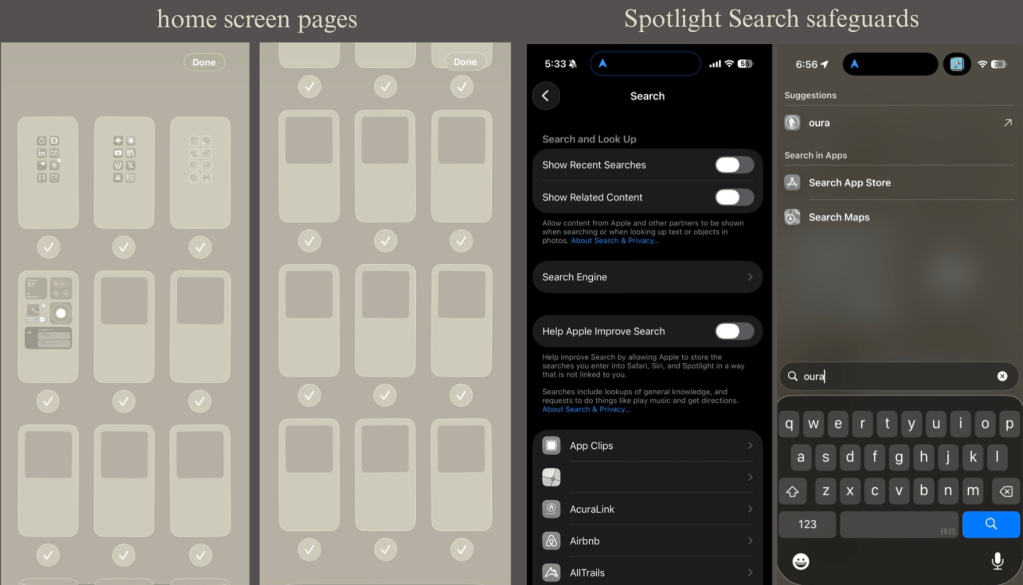
The first two pages feature apps I want to use daily, free from guilt. Page three is the rest of my deemed “productive apps” sorted into a couple folders (It’s very important to include every single app you don’t feel bad about, this way, you break the habit of relying on the library). Page four is a widget dashboard of various health and organizational tools. The following eleven pages each hold only a large, clear widget. This makes scrolling to the library require a conscious effort, a decision that feels almost shameful to make.
(if you choose to set this up and run into trouble adding more blank pages, all you have to do is continue adding large widgets and Apple creates the pages automatically)
Turn off Spotlight Search for every app
Admittedly the most tedious task on this list, but so worth it
Pull-down Spotlight Search is way too easy to access out of muscle memory. The fix is simple but time-consuming: I manually went through my settings and disabled “Show App in Search” for every single app on my phone, even the useful ones, so that I couldn’t bypass my new boundaries or fall into the habit. I never realized how much I used this feature until I pulled the kill-switch. In the first week of disabling it, I found myself naturally defaulting to search for the apps I couldn’t readily reach. Now I’m building the subconscious map of where I am supposed to be on my phone.
Hide the apps, don’t delete them
As a college student, deleting TikTok and Instagram outright is just not realistic. I instead made them as painful as possible to reach.
As if the home screen gymnastics weren’t enough, (and it honestly might not have been) I set both apps as hidden. Even when I venture to the app library, they’re buried at the very bottom and require two layers of Face ID to access. The best part about this, beyond inconvenience, is the fact that hidden apps automatically shut down when you exit (even briefly) or when your phone times out. I used to unlock my phone and find TikTok already open from earlier, which was enough to derail whatever I’d actually picked up my phone to do. Now, when I so much as receive a text mid-scroll, going back to finish scrolling almost never feels worth the effort it requires.
Automate location-based bans
The automations section of the Shortcuts app offers its own set of advantages if you’re willing to get past the initial frustration of setup.
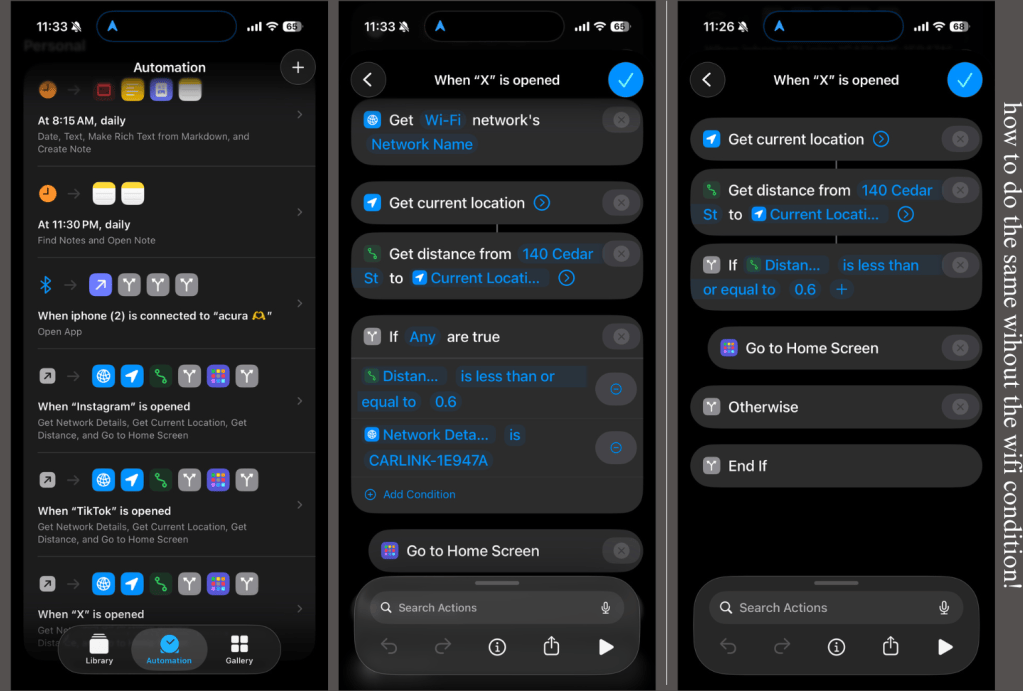
I find myself reaching for many “fillers” while walking from class to class or waiting for a bus or a lecture to start. I created an automation to entirely disable certain apps when I’m on my college campus, whether it be a scheduled class or impromptu library study session. Within a selected radius from the center of campus, opening certain apps automatically takes me back to my home screen, removing the step of even reminding me of its temporary ban. Once rerouted, I find that the larger icons in my encouraged-use section of my home screen are often enough to distract my lizard brain to pivot without even realizing what had happened.
This automation could be set up for any particular location, be it work, home, or bluetooth-based bans, instead forcing you off apps when connected to your car. I also have hard-locked social media and opening the messages app (though I can still get the CarPlay notifications as they come through) while connected to my car’s wifi.
(You will have to briefly unhide apps to set this up)
Automate a daily note
Another beneficial automation: maybe not as relevant, but useful in keeping me occupied and on track.
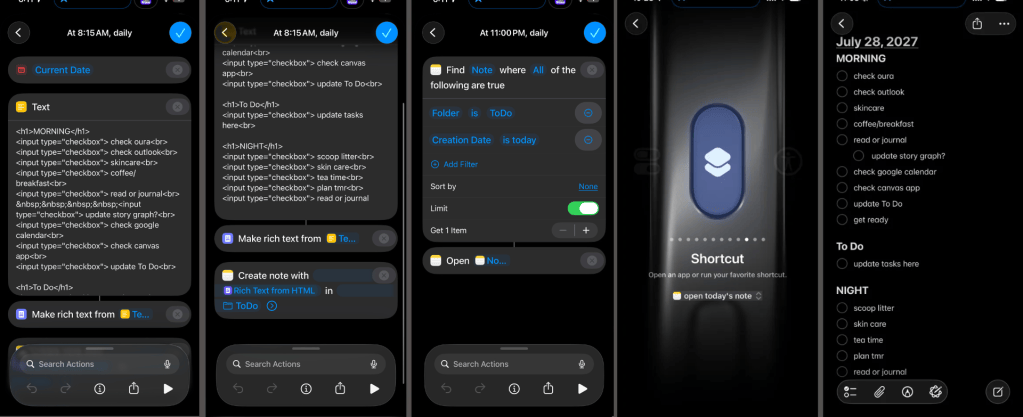
I have my phone set to open a new note every day, fifteen minutes after my alarm, and reopen it every night at 11, when my Downtime limits kick in. The note is pre-populated with a standing morning checklist of responsibilities, a blank to-do section to be filled out, and a night checklist to return to. To help encourage consistency and daily use, my action button is set to open the note throughout the day. Instead of defaulting to an algorithmic feed, my phone prompts me to check in with my intended priorities.
– – –
I can wholeheartedly say that I’ve seen a drastic improvement in my relationship with my phone. The time that used to just vanish into TikTok now actually goes somewhere: I’ve got a growing stack of books I’m finishing instead of starting and abandoning, I’ve finally picked up Obsidian and devoted hours to perfecting it, and I’ve had to purchase more journals to keep up with my newfound consistency. I still have TikTok, or more so, the comfort of knowing it’s there. Instagram still sucks me in on occasion, but only as a result of an active effort and choice to concede. Maybe soon enough, their complete removal won’t feel so overzealous. As for now, I have not suddenly developed willpower, I’ve developed habits through inhabiting a phone that’s inconvenient enough to lose.
(scroll down for visuals)



Leave a comment